

Caboodle User Guide
File Encrypt Entry

The Encrypt Entry sheet. This sheet slides out from the main editor window when you choose the FileEncrypt Entry... menu item, or the Encrypt toolbar button. This operation is only available when one entry is selected.
Enter a password or phrase to use to encrypt the entry, and enter it again to confirm that you typed it correctly. The password will not be shown. Make sure that you remember the password — there is no way to access your entry if you forget it!
You can check the Remember this password in my keychain box to have Caboodle store the entered password in your keychain. If it is in the keychain, and the keychain is unlocked, the password will be offered automatically when you come to view or decrypt the entry.
A default password can be offered from one of three sources: an existing keychain item (e.g. from when this entry was previously encrypted; from the most recently entered password for any entry (so you can easily use the same password for several entries); or a default password, as set in the Security preferences. If none of those is available, the fields are blank. Regardless, you can of course type a new password whenever desired.
Once an entry is encrypted, it displays with a lock instead of the content, and the menu item and toolbar button change to Decrypt:
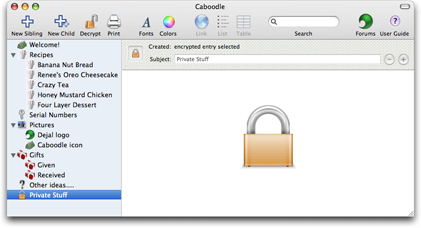
When you choose the FileDecrypt Entry... menu item or the Decrypt toolbar button, the following sheet is displayed:

Here you have two options:
- You can click View to temporarily decrypt the entry for read-only viewing, while leaving it encrypted on disk. It will remain visible until you quit Caboodle.
- Or you can click Decrypt to fully decrypt it, so it can be edited. If you decrypt it, you'll have to encrypt it again after editing if you want to keep it encrypted on disk.
Simply enter the correct password (again it won't be shown), click View or Decrypt, and the entry will be re-displayed as it was before encryption. If you don't enter the correct password, it will give you three more attempts, though you can always cancel and re-try if necessary.
As with the encryption sheet, you can save the entered password in the keychain, and it offers a password from one of the three sources: keychain, previous entry, or default password. It only offers a password if it is correct, so you can just click a button without entering anything if one is offered.
If just viewing the entry, the icon will remain as a lock, the fields will be disabled, and a reminder will appear on the dates line:

Return to the Editor window page
Return to the File menu page
Go to the User Guide Contents
Return to the main Caboodle page